Concept development and iterative design form the backbone of successful product development. From a first vague idea to a working product that customers actually want to use, this process determines the difference between innovation and failure. In this article, I share my practical approach and the methods that work best in practice.
Whether you're developing a hardware product, designing an embedded system, or building a complete IoT solution: the same principles of structured concept development and iterative design keep recurring. Below, I'll take you step by step through this process, so you can get to better, more successful products faster.
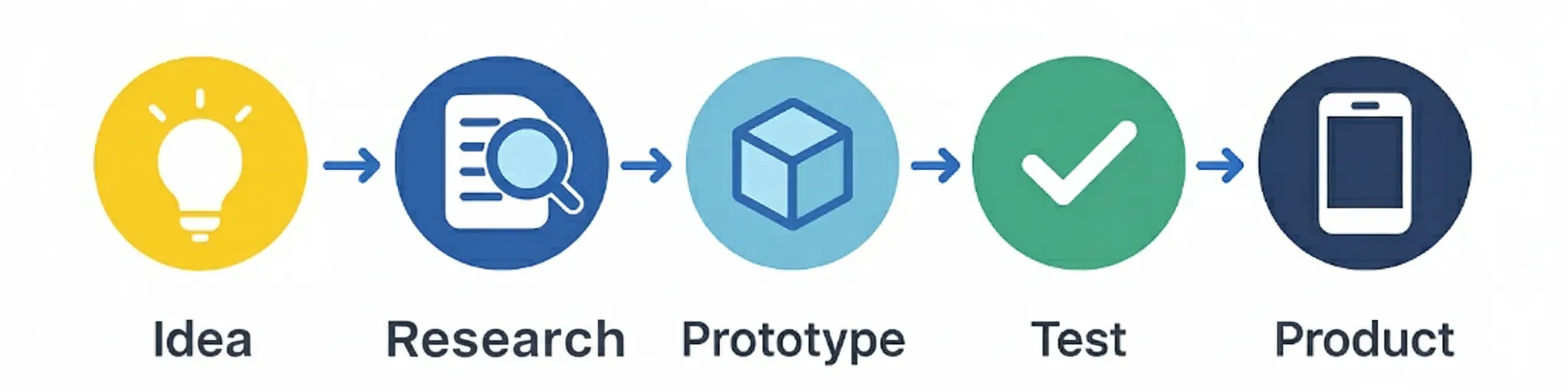
Why concept development is crucial
Concept development is much more than just coming up with an idea. It's a structured process that ensures your product actually solves a problem that people have, and does so in a way that is technically feasible, economically viable, and user-friendly. Without a solid concept development process, you often end up with a product that is technically perfect, but that no one wants to buy or use.
In my experience, most products that fail are not technically impossible, they're just not well thought out. They solve the wrong problem, are too complex for users, or are not economically viable. A good concept development process prevents these pitfalls by validating early whether your idea actually creates value for your target audience.
With concept development
- Clear problem and solution defined
- Early validation of assumptions
- Focused development on value
- Lower risks and costs
- Higher chance of market success
Without concept development
- Unclear problem definition
- Late discovery of problems
- Waste of time and resources
- High risks and costs
- High chance of failure
The phases of concept development
Concept development follows a logical sequence of phases, where each phase builds on the insights from the previous phase. It's important not to skip or rush these phases, each phase has its own value and provides crucial insights that you need in later phases. The process is iterative, meaning you regularly return to earlier phases to refine insights and make adjustments.
Problem identification
Clearly define what problem you want to solve. Who has this problem? How big is the problem? Why hasn't it been solved yet?
Market research
Research existing solutions, competition, and market potential. What are the trends? Who are your competitors?
Idea generation
Generate multiple concepts for solving the problem. Brainstorm, use creative techniques, and think out-of-the-box.
Concept selection
Evaluate and select the most promising concepts based on criteria such as feasibility, market potential, and technical complexity.
Concept refinement
Work out the selected concept in detail. Define specifications, user experience, and technical architecture.
Iterative design in practice
Iterative design is the practical implementation of concept development. Instead of trying to get everything perfect at once, you work in small, manageable steps where you test, evaluate, and improve each iteration. This process ensures that you discover and solve problems early, and that your product gets better instead of more complex.
The iterative process consists of three main phases that you repeat: Prototype, Test, and Refine. Each cycle provides new insights that you use to improve the next prototype. The goal is not to get everything perfect in each iteration, but to learn as quickly as possible what works and what doesn't.
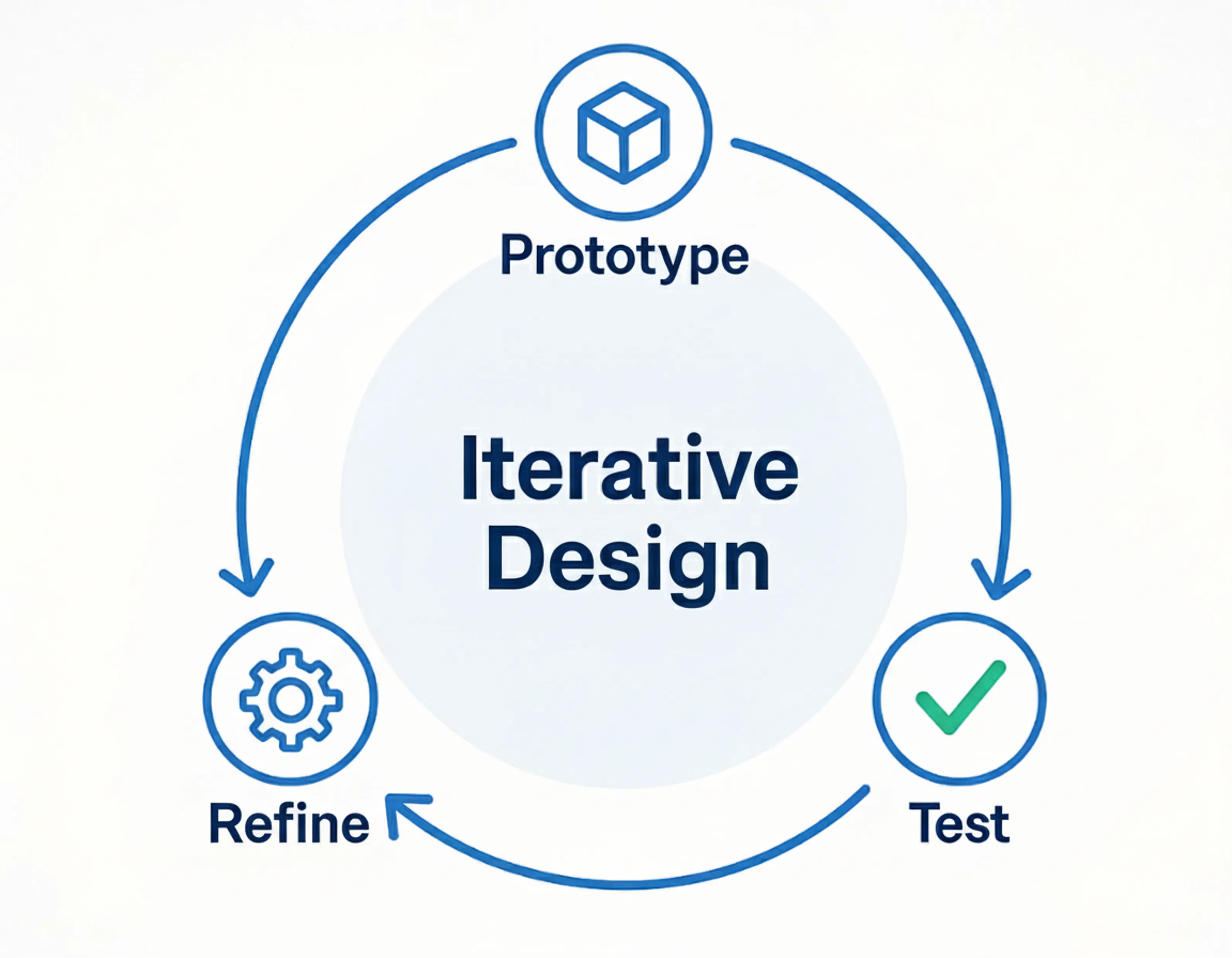
Prototype phase
Build a working model of your concept. Focus on core functionality, not perfection. Use rapid prototyping techniques.
Test phase
Test your prototype with real users or in real conditions. Collect feedback and measure performance objectively.
Refine phase
Analyze test results and identify improvement points. Plan the next iteration based on lessons learned.
Practical methods and techniques
There are countless methods and techniques you can use in concept development and iterative design. The art is to choose the right methods for your specific situation and target audience. Below I describe the methods I have found most effective in practice, with concrete examples of how you can apply them.
Design Thinking
- Empathize: Understand your users deeply
- Define: Define the problem sharply
- Ideate: Generate creative solutions
- Prototype: Build fast, cheap prototypes
- Test: Test with real users
Lean Startup
- Build: Build a minimum viable product (MVP)
- Measure: Measure what users actually do
- Learn: Learn from data and feedback
- Pivot: Adjust your approach based on insights
- Iterate: Repeat the process continuously
A practical example from my own experience: when developing an IoT sensor for industrial applications, I started with a simple breadboard prototype that only had the basic functionality. By testing this prototype with potential users, I discovered that the main challenge was not the technical functionality, but the reliability of the data connection. This insight led to a completely different focus in the next iterations, which ultimately resulted in a much more successful product.
Prototyping strategies for different phases
Prototyping is the heart of iterative design, but not all prototypes are the same. Depending on the phase you're in and what you want to test, you choose a different prototyping strategy. The goal is always to learn as quickly and cheaply as possible, without investing in details that may no longer be relevant later.
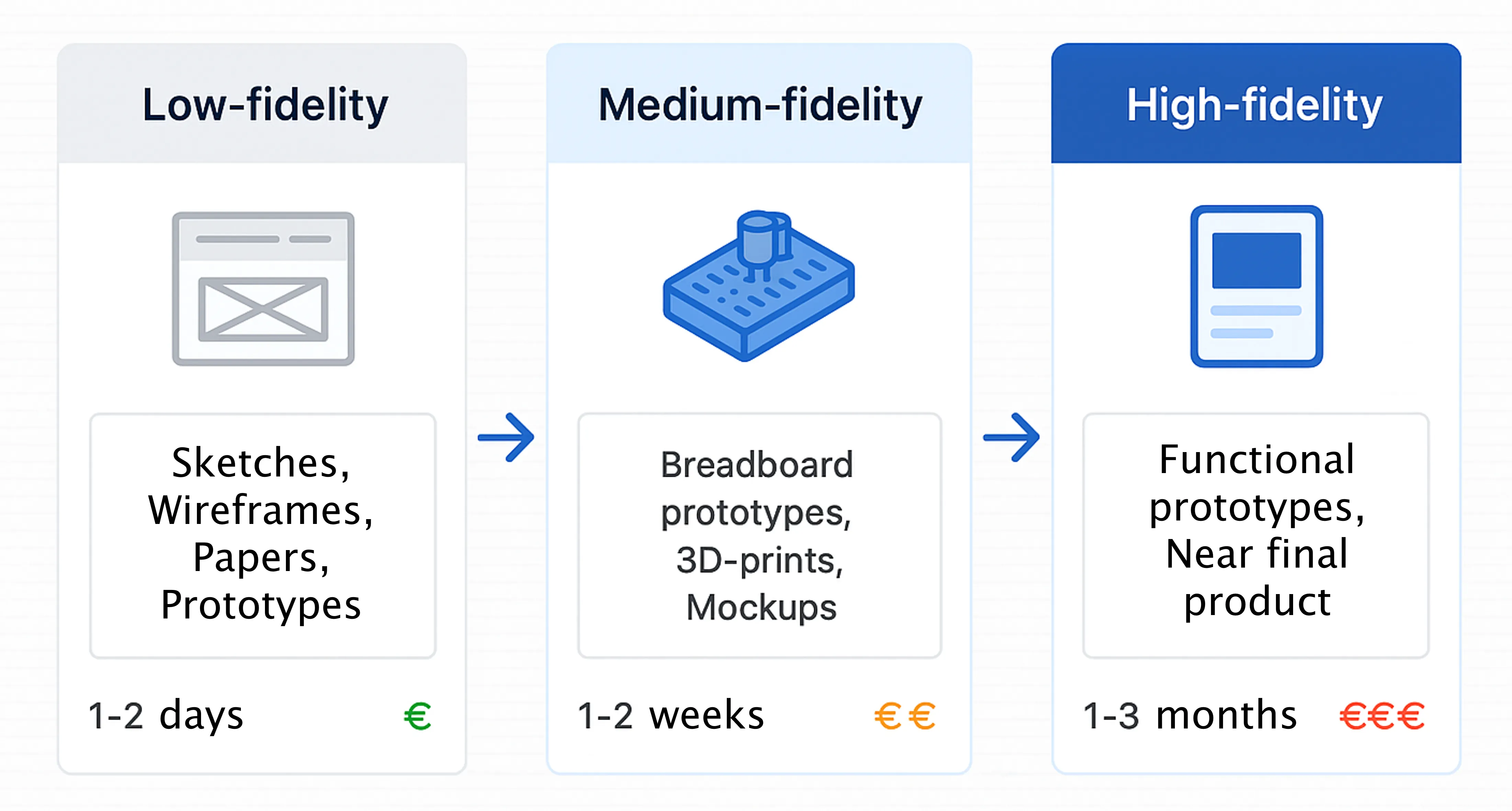
Low-fidelity prototypes are sketches, wireframes, and paper prototypes. They are perfect for testing concepts and user experience without technical complexity. These prototypes are quick to make and cheap, allowing you to try out many different ideas without investing much time or money.
Medium-fidelity prototypes are breadboard prototypes, 3D prints, and mockups. They test technical feasibility and basic functionality without full implementation. These prototypes give you a better idea of what the final product might look like and how it might work, but are still relatively quick and cheap to make.
High-fidelity prototypes are working prototypes that are close to the final product. They test performance, reliability, and user experience under real conditions. These prototypes are more expensive and time-consuming to make, but give you the most realistic picture of how your final product will perform.
The key to effective prototyping is to start with low-fidelity prototypes and gradually move to higher-fidelity. Each step should provide new insights that you use to improve the next step. Never stop prototyping, even in the production phase you can still make prototypes for new features or improvements.
Validation and feedback collection
Collecting feedback and validating your assumptions is crucial for successful concept development. Without good validation, you risk developing a product that is technically perfect, but that no one wants to use. The goal is to discover as quickly as possible whether you're on the right track, and if not, to be able to change direction quickly.
User interviews
In-depth conversations with potential users to understand their needs, pain points, and motivations. Focus on the why, not just the what.
Usability testing
Observe how users use your prototype. Pay attention to where they get stuck, what they expect, and how they react to different features.
A/B testing
Test different versions of your prototype with different groups of users. Objectively measure which version performs better on important metrics.
Analytics and metrics
Collect quantitative data on how users use your prototype. Which features are used most? Where do users drop off?
The most important thing in validation is to stay objective and not look for confirmation of your own ideas. You want to discover where your assumptions are wrong, so you can correct them before investing too much time and money in the wrong direction. Be willing to change direction if the data indicates it.
Common pitfalls and how to avoid them
After years of product development, I've seen a number of patterns that keep recurring. These common pitfalls can cause your project to fail, even if you do everything technically right. The good news is that these pitfalls can be prevented if you recognize them and deal with them proactively.
Common pitfalls
- Perfection over speed: Waiting too long to test
- Solution seeking: Without defining the problem
- Own bias: Only looking for confirmation
- Feature creep: Too many features at once
- Ignoring users: Designing for yourself
How to prevent
- Test early and often: Start with simple prototypes
- Problem first: Define the problem sharply
- Objective data: Measure and test objectively
- Focus on core: One feature per iteration
- Users central: Test with real users
A practical example: in a recent project for an industrial sensor, I started with an extensive specification and a complex prototype. After the first tests, it turned out that 80% of the functionality I had built was not needed, users had different priorities than I had assumed. By discovering this early, I could save the project, but it could have been much more efficient if I had started with a simpler prototype and tested more.
Tools and techniques for concept development
There are countless tools available for concept development and iterative design, from simple pen-and-paper methods to advanced software tools. The best tool is the one you actually use and that fits your work style and project. Below I describe the tools I have found most effective, organized by phase of the process.
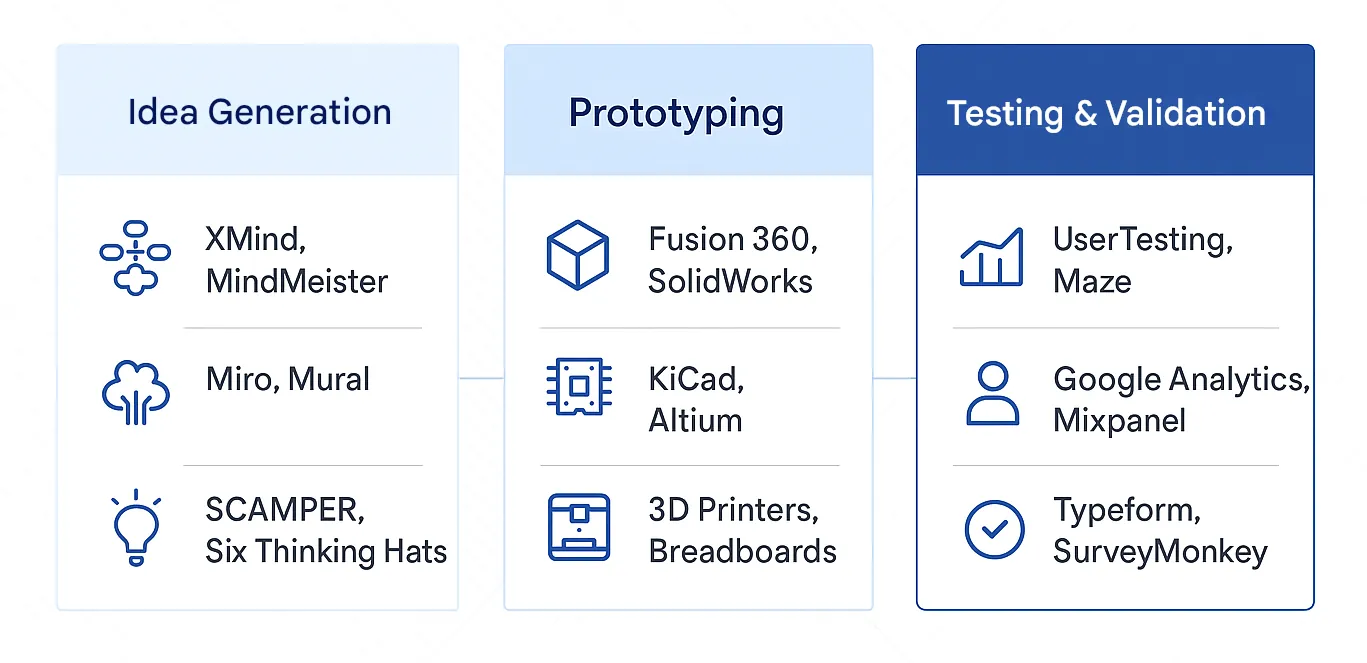
For idea generation I use mind mapping tools like XMind and MindMeister, brainstorming platforms like Miro and Mural, and creative techniques like SCAMPER and Six Thinking Hats. These tools help you systematically generate new ideas and combine existing concepts into new solutions.
For prototyping, 3D modeling software like Fusion 360 and SolidWorks are essential for hardware products, while PCB design tools like KiCad and Altium are indispensable for electronic products. Rapid prototyping tools like 3D printers and breadboards make it possible to quickly make and test physical prototypes.
For testing and validation I use user testing platforms like UserTesting and Maze, analytics tools like Google Analytics and Mixpanel, and feedback collection tools like Typeform and SurveyMonkey. These tools help you collect objective data on how users use your prototype and what they think of it.
Remember that tools are just aids, the process and mindset are more important than the specific tools you use. Start with simple tools and only upgrade if you notice you're being limited by the functionality. The best tool is the one you use consistently and that helps you learn faster and make better decisions.
From concept to production
The transition from a tested concept to a production-ready solution is a critical phase that is often underestimated. Here you need to find the balance between speed to market and quality of the final product. It's important to take the lessons from your concept development phase into the production phase, so you don't fall back into old patterns.
Design for Manufacturing
Adapt your design for efficient production. Consider materials, assembly processes, and quality control from the start.
Scalability
Make sure your solution is scalable. Don't just test with small numbers, but also think about production on a large scale.
Quality assurance
Implement quality control processes. Test not only functionality, but also reliability and durability.
Continuous improvement
Keep iterating, even after production. Collect feedback from users and use this for future versions.
The most important thing is to maintain the iterative mindset, even in the production phase. Production is not the end of the development process, it's the beginning of a new phase where you learn from real users and continuously improve your product. Plan for updates, improvements, and new versions from the start.
Checklist for successful concept development
To make sure you don't miss anything in your concept development process, here's a practical checklist you can use as a reference. This checklist is based on years of experience and helps you not forget the most important steps.
- Problem definition: Is the problem clearly defined? Who has this problem? How big is the problem? Why hasn't it been solved yet?
- Market validation: Have you researched the market? Who are your competitors? What is the market size? Are there existing solutions?
- User validation: Have you spoken with potential users? Do you understand their needs? Have you tested their feedback?
- Technical feasibility: Is your solution technically feasible? Do you have the necessary expertise? Are the required resources available?
- Economic viability: Is your solution economically viable? What are the costs? What is the price? What is the profit margin?
- Prototype tested: Have you built and tested a working prototype? Does it work as expected? Are there unexpected problems?
- Feedback processed: Have you collected and processed feedback from users? Are adjustments needed based on the tests?
- Production planning: Have you thought about production? Are the necessary materials and processes available? What are the costs?
- Quality assurance: Have you defined quality control processes? How will you test and validate during production?
- Launch strategy: Do you have a plan for the launch? How will you bring the product to market? Who is your target audience?
Conclusion: The power of structured concept development
Concept development and iterative design are not just methods, they are a mindset that helps you make better products that people actually want to use. By working structured, testing early, and continuously learning, you dramatically increase your chances of success.
The most important insight is that product development is not a linear process, but an iterative process of learning and improving. Each iteration brings you closer to a solution that truly creates value for your users. Don't be afraid to change direction if the data indicates it, that's not failure, that's learning.
Whether you're developing a hardware product, designing an embedded system, or building a complete IoT solution: the principles of concept development and iterative design remain the same. Start small, test early, learn fast, and keep iterating until you have a product that people really want to use.
Do you have an idea for a product or want help developing a concept? Feel free to get in touch. With years of experience in product development, I'm happy to help you realize your idea, from initial concept to working product.