After years of product development, I've learned that every engineer has their own workflow. What works for one person doesn't necessarily work for another. In this article, I share my personal approach: how I go from an initial idea to a working prototype, including all the pitfalls, shortcuts, and lessons I've learned along the way.
This isn't a theoretical guide, but a practical behind-the-scenes look at how I approach projects. From the first sketch on a napkin to the moment a prototype actually works. Here is my complete workflow, with all the ups and downs that come with it.
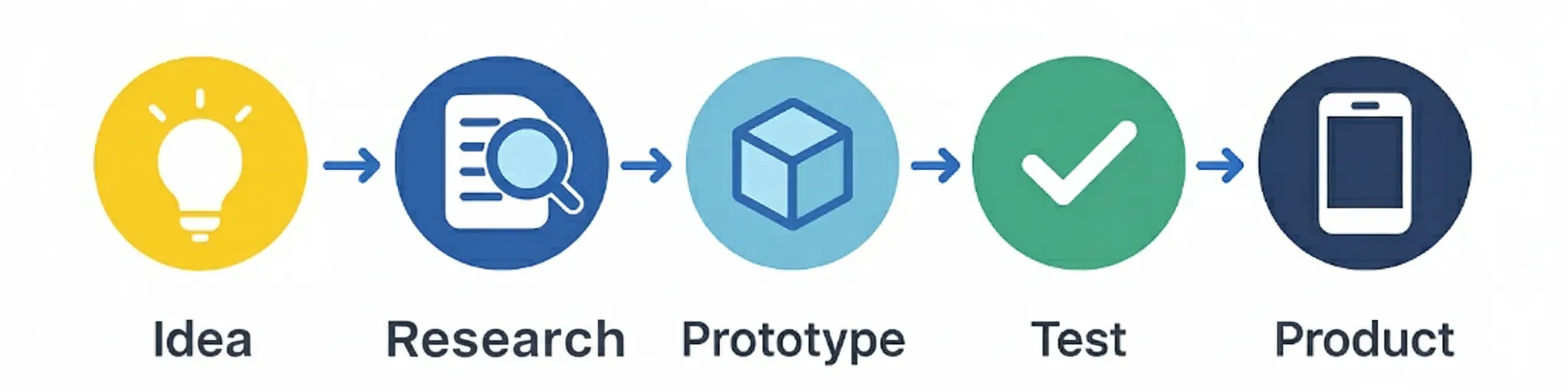
The first 24 hours: from idea to action
The moment you get an idea is magical, but it's also dangerous. Too many people get stuck in the "what if" phase and never take action. My rule is simple: within 24 hours, I must have something tangible. That could be a sketch, a breadboard, or just a list of questions I need to answer.
Why 24 hours? Because after that time, enthusiasm fades and you start to doubt. By acting quickly, you create momentum and prevent your idea from disappearing into the "I'll do this someday" category. It doesn't have to be perfect, it just needs to exist.
Hour 1-4: Capture the idea
Write down everything you know. Make a sketch, note assumptions, and ask yourself: "What's the smallest thing I can make to test this?"
Hour 5-12: First validation
Talk to one person who might have this problem. Not ten people, not a survey, just one good conversation. What you learn is worth its weight in gold.
Hour 13-24: First prototype
Build something, no matter how simple. A breadboard, a 3D print, or just a cardboard mockup. It must physically exist, not just in your head.
My golden rule: If I'm still enthusiastic about the idea after 24 hours, then it's worth continuing. If not, I let it go and move on to the next idea. There are plenty of good ideas, the problem is that we take too little action.
Week 1: The reality check
After those first 24 hours comes the reality check. Now I need to be honest with myself: is this idea really worth it? I have a simple test: can I explain the problem in one sentence to my mother or girlfriend? If they don't understand it, then it's too complex or too vague.
This week is crucial because this is where most projects die. You discover that the problem isn't as big as you thought, or that a good solution already exists, or that you simply don't have the right skills. That's okay, better now than after months of work.
Good signals
- People recognize the problem immediately
- Existing solutions are expensive/complex
- You get excited about building
- You can explain the problem simply
- You have the basic skills to start
Red flags
- People say "interesting" but nothing more
- A perfect solution already exists
- You need to learn too many new skills
- The problem is too vague/abstract
- You're already doubting after a week
My experience: Out of 10 ideas I get, maybe 2 survive this week. And that's good, it means I'm spending my time on the best ideas. Better 2 good projects than 10 mediocre ones.
Week 2-4: The first prototype
Now the real work begins. I order components, grab my breadboard, and start building. This is my favorite phase, here I see my idea come to life for the first time. But it's also the phase where I make the most mistakes.
My approach is simple: build the dumbest prototype that still works. No nice housing, no perfect code, no elegant solutions. Just something that proves the concept works. If it doesn't work, then I know I need to go back to the drawing board.
Week 2: Hardware
Breadboard, jumper wires, and the cheapest components I can find. If it works on a breadboard, it can work on a PCB too.
Week 3: Software
The simplest code that works. No error handling, no nice interfaces, just the core functionality. If it works, it's good enough.
Week 4: Testing
Test the prototype under different conditions. Does it still work? What goes wrong? What can be improved? Document everything.
My lesson learned: The first prototype is never perfect, and it doesn't need to be. The goal is to prove that the concept works, not to make a beautiful product. Perfection comes later, when I know I'm on the right track.
Month 2: The first big mistake
This always happens: your first prototype works, you're proud, and then you make the classic mistake. You think: "Now I'm going to make it beautiful." You order a PCB, you design a housing, you write beautiful code. And then you discover that you've overlooked something fundamental.
My biggest mistake? I had built a sensor that worked perfectly in the office, but once in a housing in practical use, it turned out that certain chosen components couldn't handle the temperatures they encountered in practice. This led to sensor deviations.
Common mistakes
- Going to production too quickly
- Not testing in real environment
- Pursuing perfection too early
- Not involving users
- Too many features at once
- Underestimating costs
How to prevent
- Test in real environment
- Talk to real users
- Start simple and build up
- Document all assumptions
- Plan for mistakes
- Keep track of budget
My lesson learned: Mistakes aren't bad, as long as you make them early. Better a mistake in month 2 than in month 12. And every mistake teaches you something valuable about your product and your process.
Month 3-6: The long road to a working prototype
After the first mistake comes reality: product development is hard work. You have to iterate, test, adjust, and start over. This is where most people give up, but this is also where the real work happens. Here you learn what your product really is, not what you think it is.
My approach in this phase is simple: solve one problem at a time. Not everything at once, not perfect, just step by step forward. Every week something must work that didn't work the week before. If that doesn't happen, then I'm on the wrong path.
Week 1-4: It works, but...
Your prototype works, but there are problems. The battery drains too quickly, the connection drops, or the user doesn't understand it. Solve one problem per week.
Week 5-8: It works better, but...
The big problems are solved, but there are still details. The interface is confusing, the housing is too large, or the price is too high. Focus on user experience.
Week 9-12: It works well, but...
The prototype works well, but is it production-ready? Are the costs acceptable? Is the quality consistent? Test under real conditions.
My golden rule: Every week something must be better than the week before. If that doesn't happen, then I'm on the wrong path and need to change direction. Failing fast is better than failing slowly.
My toolkit: what I really use
There are thousands of tools for product development, but I only use a handful. Why? Because I'd rather know a few tools well than many tools half-heartedly. Here's what I really use, and why.
Hardware
- Breadboard + jumper wires: For quick prototypes
- Arduino/ESP32: For proof of concepts
- Multimeter + oscilloscope: For debugging
- 3D printer: For housings and mounts
- Soldering iron: For permanent connections
Software
- Arduino IDE: For embedded code
- KiCad: For PCB design
- SolidWorks: For 3D modeling
- Git: For version control
My tip: Start with the simplest tools that work. You can always upgrade when you find yourself limited. But most projects don't need advanced tools, they just need someone who works consistently.
The moments I want to give up
Let's be honest: product development isn't always fun. There are moments when you want to give up, when you think you can't do it, when you doubt yourself. I have those moments too, and here's how I deal with them.
It doesn't work
Your prototype doesn't work and you don't know why. You've tried everything, but it's not working. This is normal. Take a break, talk to someone else, and start again.
It takes too much time
You thought it would take a month, but you've been working on it for three months already. This is also normal. Product development always takes longer than you think. Plan for 2x the time you expect.
Nobody understands it
You think you've made something great, but nobody understands it. This means you haven't defined the problem well, or your solution is too complex.
My strategy: When I want to give up, I ask myself one question: "If I saw this a year from now, would I regret stopping?" Usually the answer is yes, and then I continue. Sometimes the answer is no, and then I stop. And that's okay too.
When is a prototype ready?
This is the question I get most often: "When is my prototype ready?" The answer is simple: a prototype is never ready. It's always a work in progress, always improvable, always imperfect. But there comes a moment when you have to stop iterating and start the next project.
It works
Your prototype does what it's supposed to do. It solves the problem you wanted to solve, even if it's not perfect.
People understand it
Other people can use your prototype without explanation. They understand what it does and why it's useful.
You're proud of it
You're proud of what you've made. You want to show it to others, even if it's not perfect.
You want to move on to the next
You have new ideas, new problems you want to solve. It's time to move on.
My rule: If your prototype meets these four criteria, then it's ready. Not perfect, not production-ready, but ready enough to move on to the next project. Perfection is the enemy of progress.
Conclusion: My workflow isn't perfect, and that's okay
This is my workflow, but it's not perfect. I still make mistakes, I still doubt, and I still give up on projects that don't work. And that's okay. Product development isn't an exact science, it's a process of trial and error, of learning and adapting.
The most important thing I've learned is that there's no perfect workflow. What works for me might not work for you. What works for one project might not work for another. The art is to develop your own workflow, based on your own experiences and lessons.
Start small, test early, learn fast, and don't be afraid to make mistakes. Every mistake is a lesson, every lesson makes you better, and every improvement brings you closer to a product that people really want to use. That's my workflow, and it works for me.
Do you have an idea for a product or want help developing your own workflow? Feel free to get in touch. I'd be happy to help you realize your idea, from initial concept to working prototype. And who knows, maybe I'll learn something from you too.